AI platforms are increasingly becoming part of the way people discover and research businesses online.
But if someone finds your website through ChatGPT, Gemini, Claude or another AI assistant, can you actually see that traffic in Google Analytics 4?
The answer is yes — at least when someone clicks through to your website and the referral can be identified.
And tracking it has become considerably easier.
In May 2026, Google Analytics introduced a dedicated AI Assistant channel that automatically identifies traffic originating from recognised AI assistants.
That means you no longer necessarily need complicated regular expressions or custom reports just to identify basic AI referral traffic.
In this guide, I’ll show you how to track AI traffic in GA4, how to investigate which AI platforms are sending visitors, what those visitors actually do on your website, and where GA4’s visibility ends.
We’ll also look at the new generative AI reporting available in Google Search Console, because GA4 traffic and AI search visibility aren’t the same thing.
If you’re working on improving your visibility in AI search too, read our guide to how to get your website to show up in ChatGPT.
Can GA4 Track AI Traffic?
Yes.
Google Analytics 4 can identify website visits originating from recognised AI assistants when the relevant referral information is available.
Google introduced dedicated AI traffic measurement on 13 May 2026.
GA4 can now automatically classify recognised AI-assistant traffic using:
Default Channel Group: AI Assistant
Medium: ai-assistant
Campaign: (ai-assistant)
Google specifically introduced the feature to help website owners understand how people are discovering their websites through AI assistants and compare that traffic with channels such as organic search.
See Google’s May 2026 GA4 update
This is important because many older tutorials still tell you that the only way to track AI traffic in GA4 is by building custom regex filters.
That’s no longer the best place to start.
How to Track AI Traffic in GA4
For most business owners and marketing managers, I’d start with GA4’s native AI Assistant channel.
Step 1: Open Google Analytics 4
Sign into the GA4 property for the website you want to analyse.
Then navigate to your traffic acquisition reporting.
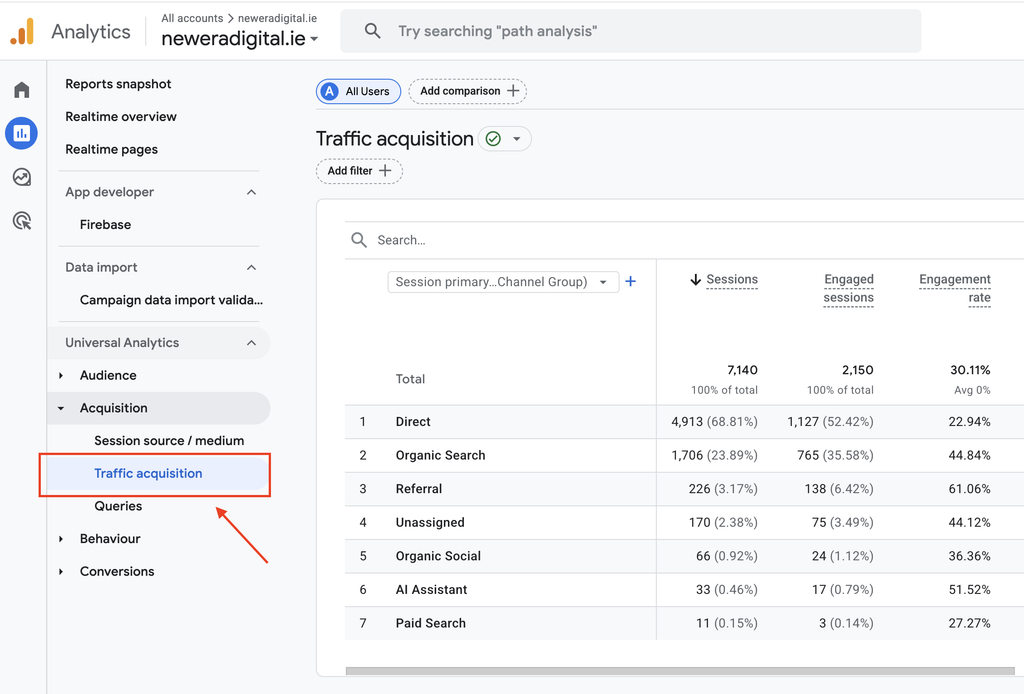
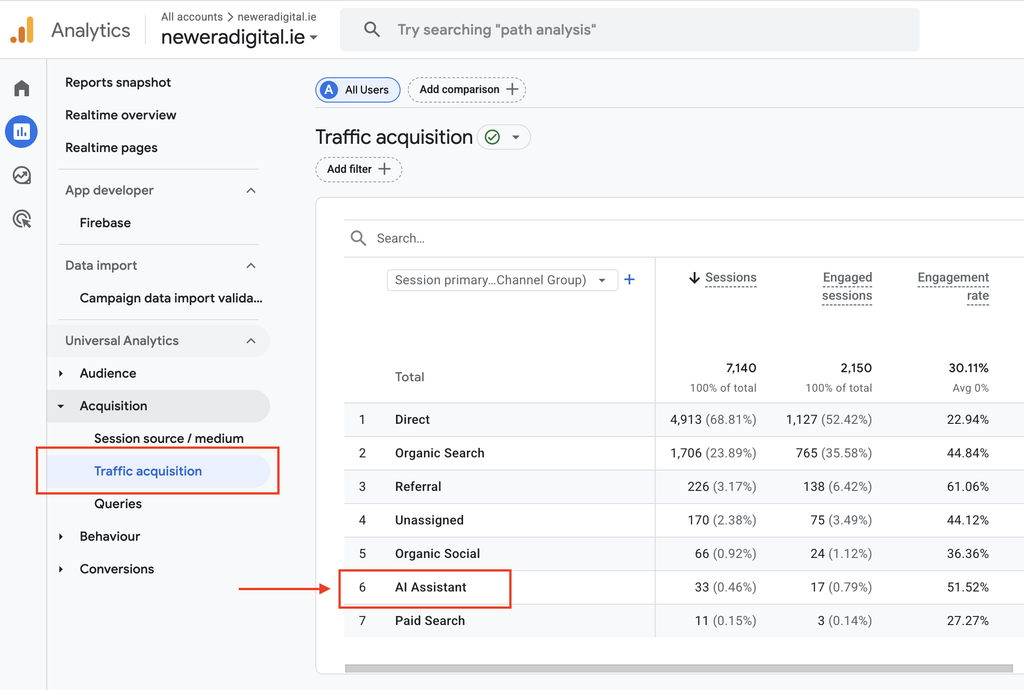
Step 2: Open Your Traffic Acquisition Report
Your Traffic Acquisition report shows where website sessions originated.
Look for the AI Assistant channel alongside channels such as:
Organic Search
Direct
Referral
Paid Search
Organic Social
If GA4 has identified visits from supported AI assistants, you should be able to analyse that traffic as its own channel.
Step 3: Look at the Source of Your AI Traffic
The AI Assistant channel tells you that traffic originated from an AI assistant.
But you’ll probably want to know which one.
Change or add your report dimension so you can investigate the relevant traffic source.
Depending on the traffic you’re receiving, you may see identifiable referrals from AI platforms.
Google’s documentation also allows AI-assistant traffic to be analysed through traffic-source dimensions rather than simply lumping everything together as ordinary referral traffic.
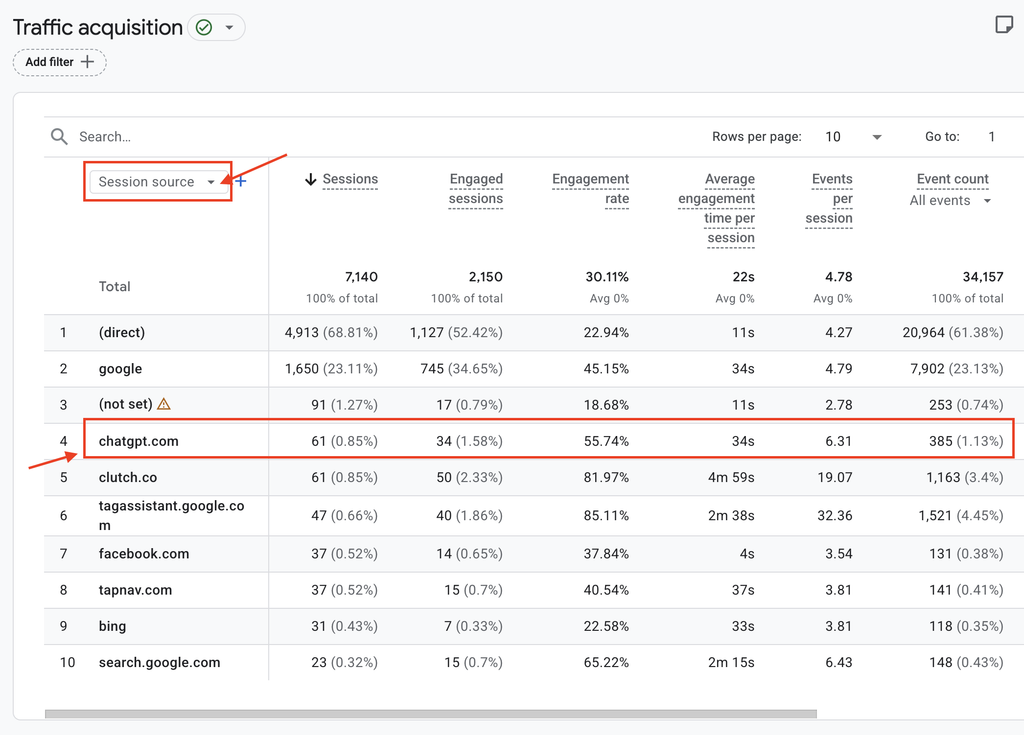
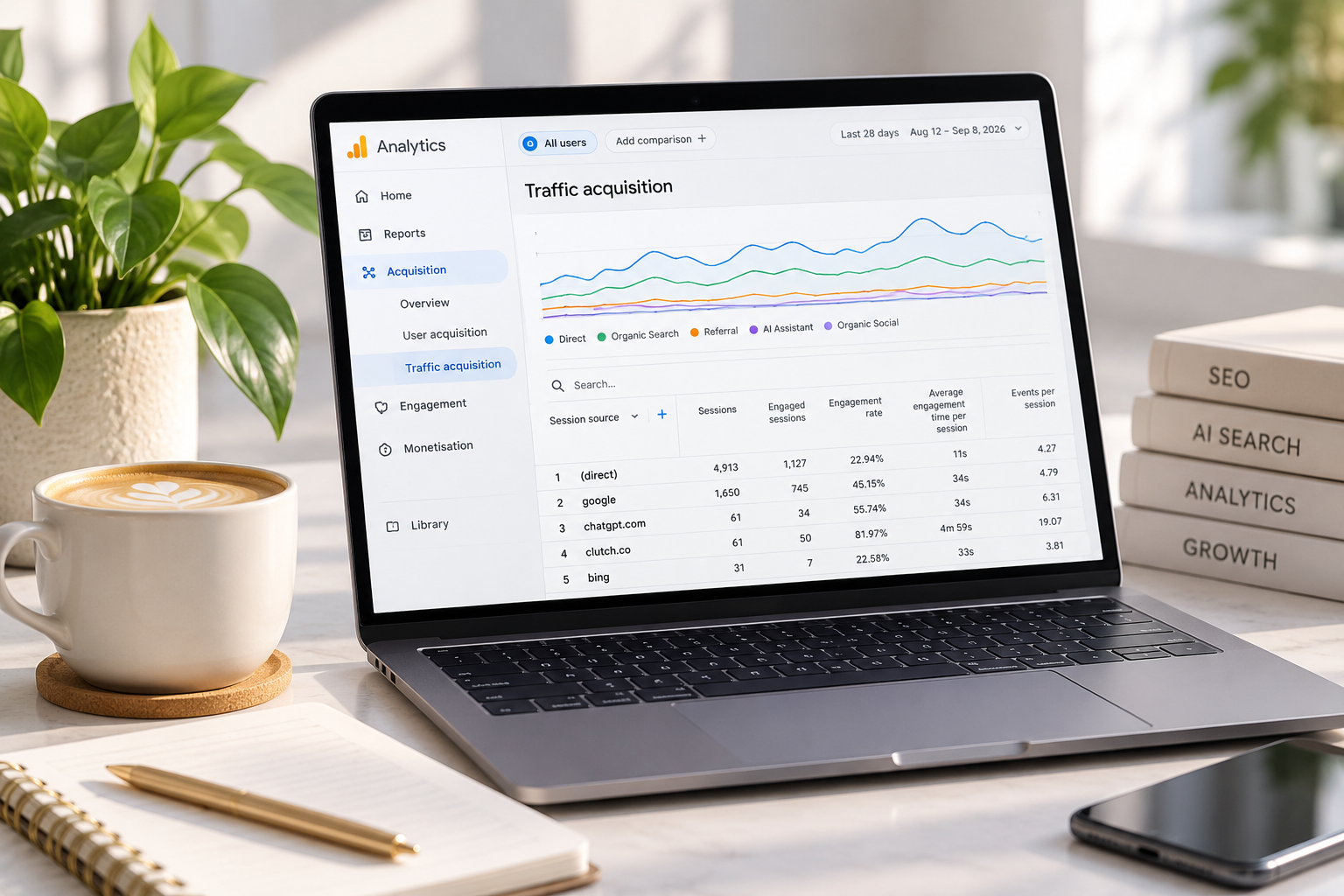
Example from New Era Digital: In our own GA4 data, ChatGPT appears as an identifiable session source. In this example, chatgpt.com generated 61 sessions with a 55.74% engagement rate and three recorded key events. This demonstrates how AI referral traffic can be measured alongside traditional sources such as Google.
This is where the report becomes much more useful.
You don’t simply want to know:
“We received 50 AI visits.”
You want to understand:
Where did they come from?
And eventually:
Did those visits contribute to enquiries, sales or other meaningful actions?
Which AI Platforms Can GA4 Track?
This is where I’d be careful with some of the existing tutorials.
The list of AI platforms recognised by analytics systems can change.
Google’s May announcement specifically referenced assistants such as ChatGPT, Gemini and Claude when introducing the native channel.
Google’s current documentation for custom AI-assistant channel groups also provides examples including ChatGPT, Gemini, Microsoft Copilot, Claude and Perplexity.
Rather than relying on a fixed list forever, check how your own traffic is being classified.
And remember:
GA4 can only measure a website visit if a visit actually occurs.
Someone seeing your business recommended inside an AI response is a different measurement problem.
We’ll come back to that shortly.
How to Measure What AI Visitors Do on Your Website
This is where I think businesses should go further than simply counting AI sessions.
Traffic by itself doesn’t tell you whether AI visibility is commercially valuable.
I’d want to look at metrics such as:
- sessions
- engaged sessions
- engagement rate
- key events
- enquiries
- ecommerce purchases
- revenue
- landing pages
For New Era Digital, for example, I’m considerably more interested in whether an AI-referred visitor books a consultation or enquires about SEO than whether ChatGPT generated another session in Analytics.
For an ecommerce business, I’d want to know whether AI-referred visitors:
view products → add to basket → purchase → generate revenue.
For a local service business:
visit service page → view contact information → submit enquiry.
That’s where AI traffic measurement becomes useful business intelligence rather than another vanity metric.
Which Pages Are AI Visitors Landing On?
This is another report I’d check.
AI platforms may not necessarily send visitors to your homepage.
They could surface:
- blog articles
- service pages
- product pages
- comparison content
- guides
- case studies
Looking at landing pages can help you understand which content AI-assisted visitors are actually discovering.
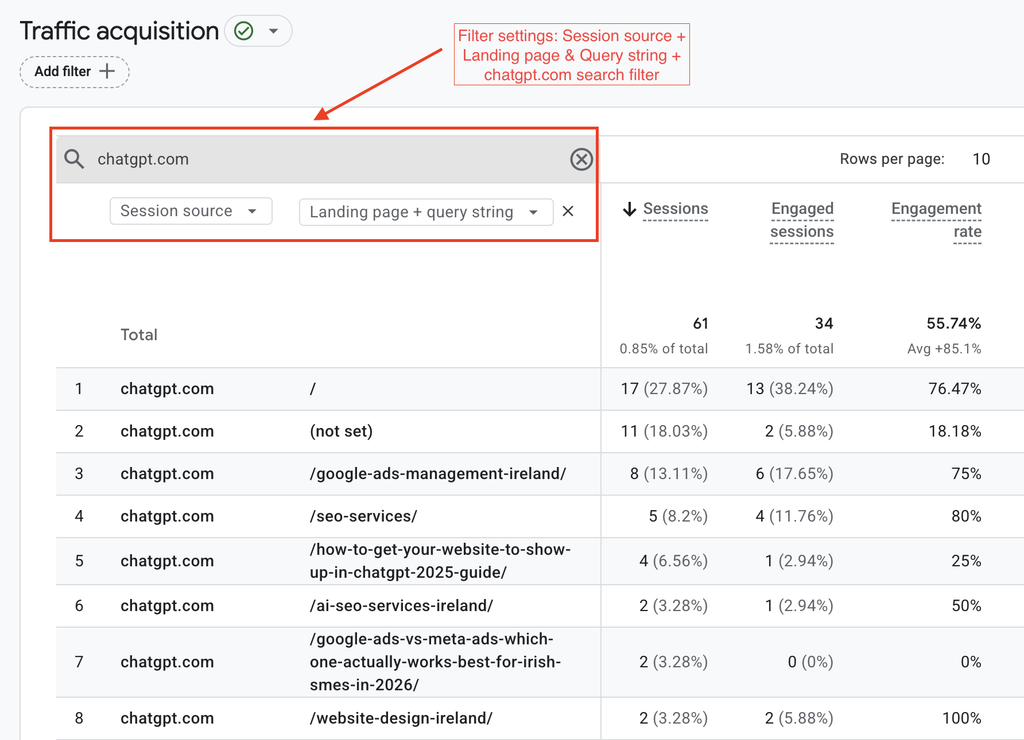
Here’s an example from our own New Era Digital GA4 account. By filtering the session source to chatgpt.com and adding Landing page + query string, we can see which pages people visited after clicking through from ChatGPT.
In this example, ChatGPT sent visitors directly to our homepage as well as our SEO Services, Google Ads Management, AI SEO, Website Design and blog content.
This is useful because it shows that AI referral traffic doesn’t necessarily arrive through your homepage. AI platforms can send potential customers directly to the page most relevant to what they’re researching.
If one particular article or page starts receiving traffic from ChatGPT or another AI assistant, that’s useful information. It may indicate that the page is being surfaced during AI-assisted research.
But be careful with the conclusion. A referral visit tells you someone clicked through from an AI platform. It doesn’t automatically prove that the page consistently appears, is cited or is recommended for a particular AI prompt.
Those are different things — and that’s why we measure AI referral traffic and AI visibility separately.
What If AI Traffic Isn’t Appearing Correctly?
This is where a custom channel group can still be useful.
Google provides instructions for creating a custom channel group specifically for AI assistants.
You can create a channel and use a regular expression to capture traffic from AI domains you want to include.
Google’s own example currently includes variations covering ChatGPT/OpenAI, Gemini, Copilot, Perplexity and other AI referrals.
Google’s guide to creating a custom AI Assistant channel group
Do you need to do this?
Not necessarily.
This is one area where older articles can make AI tracking look more complicated than it needs to be.
I’d use the native AI Assistant channel first.
Then consider a custom channel group if:
- you want greater control over which sources are included
- an AI platform you care about isn’t being classified as expected
- you need a customised reporting setup
- you’re carrying out more advanced AI traffic analysis
For the average small business simply trying to understand whether ChatGPT and other AI platforms are sending traffic, start simple.
Can You Track ChatGPT Traffic in GA4?
Yes — when a visitor clicks through from ChatGPT and GA4 receives the necessary referral information.
If ChatGPT sends someone directly to your website and GA4 identifies it as an AI-assistant referral, you can analyse that traffic and what happens afterwards.
But this distinction is crucial:
ChatGPT referral traffic ≠ your total visibility in ChatGPT.
Imagine someone asks:
“Which SEO agencies in Ireland specialise in small businesses?”
ChatGPT mentions New Era Digital.
The person doesn’t click.
Later that afternoon they search:
New Era Digital
and visit the website through Google.
GA4 can measure the website visit.
But it cannot look backwards and tell you:
“This customer originally discovered New Era Digital through a ChatGPT recommendation.”
That’s part of the increasingly fragmented AI customer journey.
What GA4 Cannot Tell You About AI Visibility
This is probably the most important limitation to understand.
GA4 measures activity associated with your website.
It is not an AI visibility tracker.
It can’t give you a complete picture of:
How often your brand is mentioned in ChatGPT
Whether your business is recommended for an important prompt
How you compare with competitors across AI answers
Whether someone researched your company in AI and later visited another way
How often your website was considered but wasn’t clicked
So if you receive only a small amount of identifiable AI referral traffic, don’t automatically conclude:
“AI isn’t doing anything for us.”
The customer may have encountered your business elsewhere in the journey.
This is why I recommend measuring AI traffic and AI visibility separately.
GA4 vs Search Console for AI Traffic: What’s the Difference?
This has become particularly important in 2026 because Google Search Console has changed too.
| GA4 | Google Search Console |
|---|---|
| Measures activity on your website | Measures visibility within Google Search |
| Can identify attributable AI-assistant referrals | Reports visibility in Google’s generative AI search |
| Shows user behaviour after arriving | Shows impressions within Google’s AI features |
| Can measure enquiries/key events/revenue | Helps identify pages receiving generative AI impressions |
| Includes external referral sources | Covers Google rather than ChatGPT/Claude/etc. |
| Useful for traffic and conversions | Useful for Google AI search visibility |
You really want both.
Google Search Console Now Reports Generative AI Visibility
This is one of the biggest SEO reporting changes of 2026.
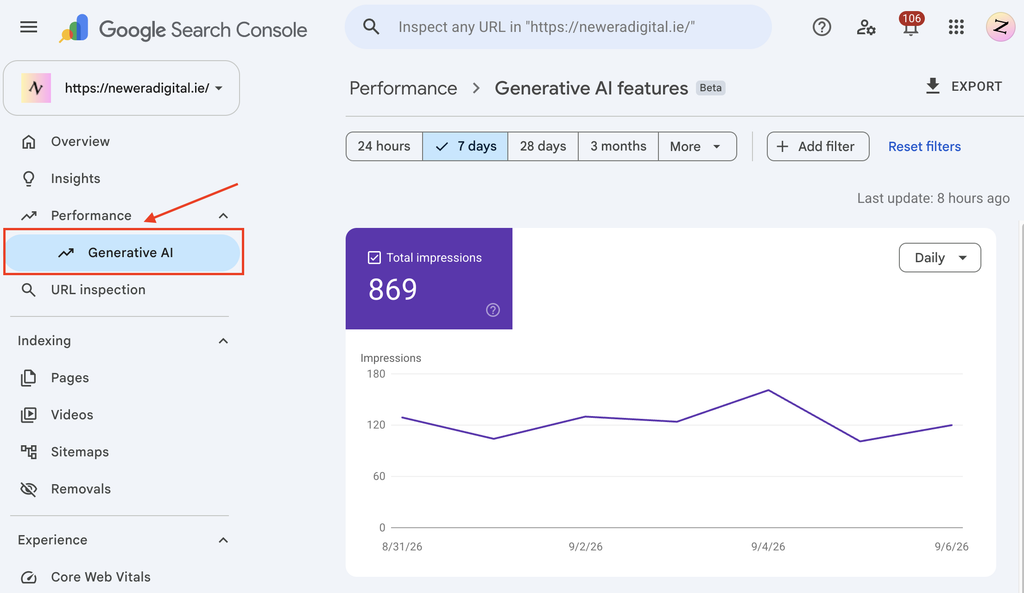
Google launched dedicated Generative AI performance reports in Search Console in June and completed the worldwide rollout on 31 August 2026.
The Search report currently includes impressions from:
AI Overviews
and
AI Mode
Google says you can use the report to see:
- how generative AI impressions change over time
- which pages receive the most or fewest impressions
- where those impressions originate, including dimensions such as device and country
The data also remains incorporated into Google’s overall Performance reporting.
Google’s Generative AI performance report documentation
One interesting limitation
The dedicated Search Console generative AI report currently focuses on impressions.
That’s different from GA4, where we’re analysing actual website visits and subsequent behaviour.
So again:
Search Console AI visibility ≠ GA4 AI referral traffic.
They answer different questions.
There’s Also a New Search Console AI Control
Another very recent change worth knowing about is Google’s Search generative AI control.
As of 31 August 2026, Google says this control has also rolled out worldwide.
Website owners can manage whether their site’s links and content are eligible for Google’s generative AI features, including:
AI Overviews
AI Mode
and generative AI features in Google Discover.
You’ll find the setting under:
Search Console → Settings → Search generative AI
Google’s Search generative AI control documentation
For most businesses actively investing in SEO and AI visibility, I’d obviously want to understand this setting before accidentally excluding the site from the very AI search experiences we’re trying to appear in.
How I Recommend Measuring AI Search in 2026
I wouldn’t create one magical “AI traffic” KPI.
I’d build a small measurement framework.
1. AI referral traffic
Use GA4’s AI Assistant channel to understand identifiable visits from AI assistants.
2. AI traffic quality
Look at engagement, key events, enquiries, sales and revenue.
3. Google AI visibility
Use Search Console’s Generative AI performance report to monitor impressions across AI Overviews and AI Mode.
4. AI citations and mentions
Monitor whether your brand and website appear for commercially relevant prompts across the AI platforms your customers use.
5. AI recommendations
Track whether your business is actually being recommended when someone asks for providers, products or expertise in your market.
6. Traditional SEO performance
Don’t stop measuring rankings, organic visibility, traffic and conversions.
AI search isn’t replacing the rest of your marketing measurement.
It’s adding another layer to it.
Frequently Asked Questions About Tracking AI Traffic in GA4
How do I track AI traffic in GA4?
Start with GA4’s native AI Assistant channel in your Traffic Acquisition reporting. Google introduced the channel in May 2026 to automatically identify traffic from recognised AI assistants.
Does Google Analytics track ChatGPT traffic?
GA4 can identify attributable traffic from ChatGPT when a user clicks through to your website and the necessary referral information is available.
However, it cannot measure every time your brand is mentioned or recommended inside ChatGPT.
Do I need a regex to track AI traffic in GA4?
Not necessarily.
Before May 2026, custom regex filters and channel groups were commonly used to isolate AI referrals. GA4 now has a native AI Assistant channel.
Custom channel groups remain useful when you want more control or need to capture sources differently.
Can GA4 track Perplexity traffic?
Referral traffic from AI platforms can potentially be identified when referral information reaches GA4. Google also includes Perplexity in its current example for building a custom AI-assistant channel group.
Can Search Console show AI traffic?
Search Console now provides a dedicated Generative AI performance report for Google’s AI search features.
As of September 2026, the Search report includes AI Overviews and AI Mode impressions. It isn’t a replacement for GA4 and doesn’t report external AI platforms such as ChatGPT.
What’s the difference between AI traffic and AI visibility?
AI traffic means people actually arriving at your website from an attributable source.
AI visibility is broader. Your business could be cited, mentioned or recommended within an AI-generated answer even if the user never clicks through.
Both are worth measuring.
AI Traffic Is Only Part of the Picture
Being able to track AI referral traffic is a welcome improvement.
For businesses, GA4’s native AI Assistant channel makes it considerably easier to understand when AI assistants are actually sending people to your website.
And Google’s new Search Console generative AI reporting gives us much better first-party insight into visibility across AI Overviews and AI Mode.
But neither tells us the entire customer journey.
Someone might discover your business through ChatGPT, encounter you again in Google, read your reviews and visit your website directly days later.
That’s why modern search measurement needs to consider:
rankings → AI visibility → citations → recommendations → traffic → leads → sales.
After more than 15 years working in SEO, I’ve seen the way we measure search change repeatedly. AI is simply the latest reason we need to look beyond one metric or one platform.
The goal isn’t to collect more reports.
It’s to understand where your customers are finding you and whether that visibility is contributing to business growth.
If you’d like to understand how visible your business is across traditional search and AI-powered platforms, explore our AI SEO & GEO Services.